When Is Closed Testing Mandatory?
Introduction
If you’re publishing an Android app on Google Play, you’ve likely heard about Google’s closed testing requirement — but when exactly is it mandatory?
Since Google introduced stricter app review rules in 2024, thousands of developers have faced production rejections for skipping the closed testing phase.
This article explains when closed testing is required, how to identify if your app qualifies, and what happens if you skip it.
Quick Answer / TL;DR
Closed testing is mandatory for all new apps and newly created developer accounts before production release on Google Play. You must run a closed test with at least 12 active testers for 14 consecutive days before your app can be approved for public access.
When Closed Testing Becomes Mandatory
Google enforces the closed testing phase in the following cases:
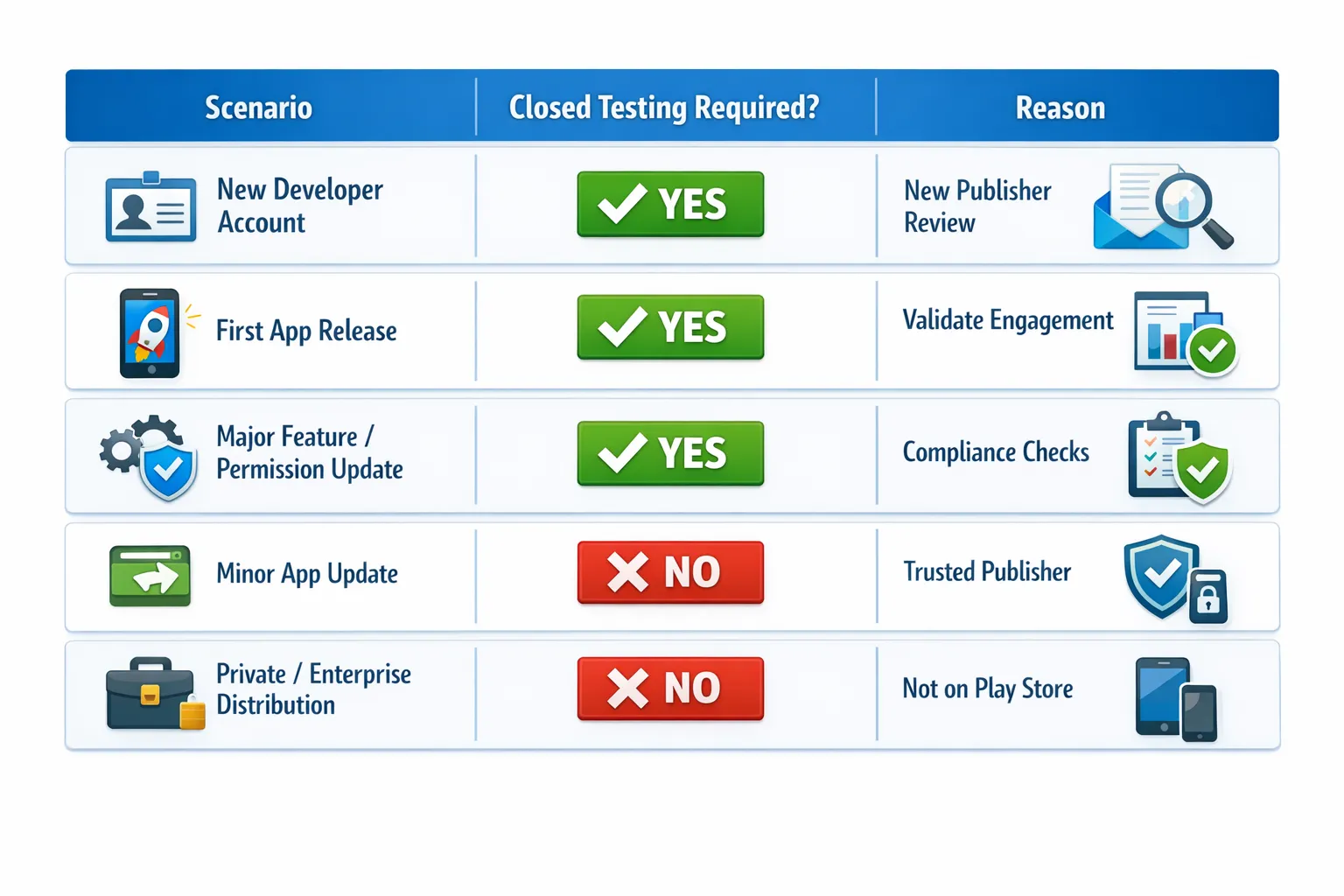
- New Developer Accounts – Any newly created Google Play Developer account must complete a closed test before publishing its first app.
- First-Time App Releases – If your app has never been live before, closed testing is required.
- Major App Redesigns or Category Changes – Apps that change functionality, permissions, or category (e.g., from utility to finance) may trigger a new testing requirement.
- High-Risk App Types – Apps in sensitive categories (health, finance, communication) often require extended testing verification.
- Enhanced Review Accounts – Developers under Google’s stricter review or reactivation policies must comply with closed testing before resubmission.
⚠️ Skipping this step will result in a “Production access denied” notice in your Play Console, even if the app appears ready for release.
How Google Decides If You Must Complete Closed Testing
Google Play automatically evaluates your developer and app profile based on factors like:
- Account history and age
- Policy compliance record
- App category and permissions
- Target SDK and user data usage
- Previous testing or release history
If your account doesn’t meet Google’s trust threshold, closed testing becomes mandatory before the production rollout option becomes available.
Exceptions: When Closed Testing May Not Be Required
Some developers may not need closed testing if:
- They already have established apps live on Google Play with a clean record.
- They’re publishing a minor update or maintenance release.
- The app is under an enterprise or private track (not for public listing).
However, Google can still enforce closed testing if the app introduces new features, permissions, or data-handling changes that impact compliance or user privacy.
✅ Always check your Play Console for the “Production Access Requirements” message — it will confirm if closed testing is required for your app.
What Happens If You Skip Closed Testing
If you attempt to publish without completing the required 14-day closed test, Google will reject your production release with an error message like:
“Production Access Denied: App must complete closed testing with at least 12 active testers for 14 consecutive days.”
This rejection not only delays your release but can also flag your account for extended review. Skipping closed testing signals to Google that your app hasn’t met quality or participation standards.
Why Google Made Closed Testing Mandatory
Google introduced mandatory closed testing to:
- Protect user experience by ensuring apps are stable and functional.
- Reduce spam and low-quality apps from first-time publishers.
- Verify engagement through real testers, not bots or inactive users.
- Ensure compliance with data, privacy, and policy standards.
This policy shift aligns with Google’s broader focus on security, reliability, and transparency within the Play ecosystem.
How to Confirm If Closed Testing Is Required
Follow these steps to verify your requirement status:
- Open Play Console → Navigate to your app.
- Go to “Testing” → “Closed testing.”
- Look for a banner that says “Production access pending” or “Complete closed testing to continue.”
- If visible, you must complete the full 14-day cycle before submission.
You can also find this in the “App dashboard” → “Production readiness” section.
Common Scenarios That Trigger Mandatory Closed Testing
Tips to Pass the Closed Testing Phase
- Use real, verified testers who stay active the full 14 days.
- Avoid updating or removing testers during the testing period.
- Monitor participation daily in the Play Console.
- Use platforms like 12testers14days.com for reliable tester activity.
Completing testing correctly the first time prevents production delays or resets.
Official References
- Google Play Console – Testing Tracks Overview
- Production Access Requirements
- Android Developers – Play Testing Guide
Frequently Asked Questions
Do all developers need closed testing?
No, but it’s mandatory for new accounts and first-time app releases.
Does internal testing count?
No. Internal testing does not meet the 12 testers for 14 days requirement.
Can I publish without completing closed testing?
No. You’ll receive a “Production access denied” error if closed testing isn’t complete.
Can I shorten the 14-day period?
No. Google requires 14 full consecutive days of tester participation.
Does this rule apply to app updates?
Only if the app undergoes major structural or permission changes.
Conclusion
Closed testing is not optional for most new apps and developer accounts.
It’s Google’s way of ensuring apps are stable, secure, and user-ready before they reach the Play Store. By confirming whether your app requires closed testing early, you can avoid production delays and focus on building a high-quality release.
To meet the 12-for-14 rule efficiently, use professional testers from 12testers14days.com and stay fully compliant with Google’s policy.